8.2.7. Example: Stable Diffusion
Stable Diffusion is a text-to-image generative model that synthesizes images by gradually denoising latent representations conditioned on a text prompt. This example shows how to prepare a dataset, fine-tune a Stable Diffusion model, and run inference with MLSDK on MN-Core2 or PFVM.
The example uses Caltech 256 as a lightweight demonstration dataset and CompVis/stable-diffusion-v1-4 as the base model. The training example fine-tunes the UNet component by default and stores the resulting model in Diffusers-compatible format so that it can be reused for later inference.
The source code for this example is located at /opt/pfn/pfcomp/codegen/MLSDK/examples/stable_diffusion.
Note
The model used in this training and evaluation workflow is CompVis/stable-diffusion-v1-4. Its license is CreativeML Open RAIL-M. This example includes logic to download the model automatically when needed.
Note
This example uses a modified version of Caltech 256 as its dataset. The dataset is distributed under CC BY 4.0. The specific modifications are described in Dataset Preparation.
This example is organized into three stages:
8.2.7.1. Dataset Preparation
The files preparation.sh and preparation.py convert the original Caltech 256 archive into the directory structure expected by the Hugging Face imagefolder dataset loader used by the training script.
preparation.sh performs the high-level orchestration:
Downloads the Caltech 256 archive if it is not already present under
${dataset_dir}Extracts the archive into
${dataset_dir}/data/trainInvokes
preparation.pywhen the dataset has not yet been converted
preparation.py then normalizes the extracted dataset into a format suitable for this example:
Renames each category directory by removing the numeric prefix included in the original Caltech 256 archive
Removes the
-101suffix from category names when presentRenames image files so that only the trailing filename portion remains
Deletes files that do not match the expected naming pattern
Generates a
metadata.csvfile inside each category directory
Each generated metadata.csv contains the columns file_name and caption.
The caption is set to the category name, so the dataset becomes directly usable for text-to-image fine-tuning.
For example, all images in the airplanes directory receive the caption airplanes.
If --target_folders is specified, only the listed categories are kept and all other extracted categories are removed during preprocessing.
This is useful when you want to reduce preparation time or train on a smaller subset of classes.
8.2.7.1.1. Usage
$ cd /opt/pfn/pfcomp/codegen/MLSDK/examples/stable_diffusion
$ dataset_dir=/path/to/dataset ./preparation.sh [--target_folders [FOLDER_NAMES]]
Parameters:
dataset_dir: Directory used to store both the downloaded archive and the prepared dataset. After preparation, the training images are placed under
/path/to/dataset/data/train.target_folders: (Optional) Limits preparation to specific Caltech 256 object categories. For example,
--target_folders airplanes mushroomprepares only those categories. If omitted, all categories are prepared. For valid names, refer to name_list.txt.
8.2.7.2. Training
stable_diffusion_training.sh prepares the execution environment and then launches stable_diffusion_training.py.
The wrapper script creates or reuses a Python virtual environment, installs the example requirements, sets necessary environment variables, then invokes the training script with the provided command-line arguments.
stable_diffusion_training.py performs the actual training workflow:
Loads the prepared dataset with Hugging Face
datasetsusing theimagefolderloaderReads captions from the per-class
metadata.csvfiles created during dataset preparationResizes and randomly crops input images to the configured resolution
Loads the Stable Diffusion components from the configured model path
Creates MLSDK-compiled functions
Fine-tunes the UNet by default and optionally saves the resulting model in Diffusers format
By default, the script performs a short demonstration run with one epoch and saves the trained model under <out_dir>/model.
The output directory may also contain compilation caches and timing artifacts produced during execution.
The training script supports the following backends:
mncore2:0: Run on the first MN-Core2 devicepfvm:cpu: Run through PFVM on CPU
Runtime defaults are defined in configs.toml.
The training and evaluation scripts call apply_toml_defaults(), so entries in configs.toml are exposed as command-line options and can be overridden from the shell.
8.2.7.2.1. Usage
$ cd /opt/pfn/pfcomp/codegen/MLSDK/examples/stable_diffusion
$ dataset_dir=/path/to/dataset ./stable_diffusion_training.sh \
    --backend mncore2:0 \
    --outdir /path/to/train/output
Parameters:
dataset_dir: Path to the prepared dataset root. The wrapper passes
${dataset_dir}/datato the training script.backend: Backend used for training. Valid values are
mncore2:0andpfvm:cpu.outdir: Directory in which training outputs are stored. If omitted, a backend-specific directory under
/tmpis created automatically.
8.2.7.2.2. Outputs
After a successful training run, the output directory contains:
model/: The fine-tuned Diffusers model saved withsave_pretrained()Per-component code generation directories such as
text_encoder/,unet/, andvae_encoder/Per-component cache directories such as
text_encoder_cache/,unet_cache/, andvae_encoder_cache/Compiler reports, layout dumps, traces, and related artifacts under each generated component directory
8.2.7.3. Inference
stable_diffusion_eval.sh sets up the same Python environment as the training script and then launches stable_diffusion_eval.py.
Using the same environment is important when loading a trained model because the example depends on the installed Diffusers version and related Python packages.
Like the training path, stable_diffusion_eval.py also loads configs.toml through apply_toml_defaults(), so the documented defaults in configs.toml apply to inference as well.
stable_diffusion_eval.py performs the following steps:
Loads a Stable Diffusion pipeline from the configured model path
Optionally disables the safety checker
Creates compiled evaluation functions for the text encoder, UNet, and VAE decoder
Generates an image for the specified prompt
Saves the resulting image as
output_eval.pngin the selected output directory
The safety checker is the standard Stable Diffusion post-processing component that inspects decoded images for potentially NSFW content. In this example, the behavior is controlled by skip_safety_check in configs.toml. The current default is to skip the check. This avoids the case where the safety checker suppresses the generated result and the example effectively produces a black image instead of a visible sample. If you need the additional content filtering step, set skip_safety_check = false before running inference.
If model_path points to the directory saved by the training step, inference uses the fine-tuned model.
If not specified, the default base model from configs.toml is used.
8.2.7.3.1. Usage
$ cd /opt/pfn/pfcomp/codegen/MLSDK/examples/stable_diffusion
$ ./stable_diffusion_eval.sh \
    --backend mncore2:0 \
    --outdir /path/to/inference/output \
    [--model_path /path/to/train/output/model] \
    [--prompt "your text prompt here"]
Parameters:
backend: Backend used for inference. Valid values are
mncore2:0andpfvm:cpu.outdir: Directory used to store inference artifacts. The generated image is saved as
/path/to/inference/output/output_eval.png.model_path: (Optional) Path to a fine-tuned model directory, typically
<training outdir>/model. If omitted, the default model fromconfigs.tomlis used.prompt: (Optional) Text prompt that guides image generation. If omitted, the default prompt is
dog.
8.2.7.3.2. Outputs
After a successful inference run, the output directory contains:
output_eval.png: The generated imagePer-component evaluation code generation directories such as
text_encoder_eval_eval/,unet_eval_eval/, andvae_decoder_eval/Per-component cache directories such as
text_encoder_eval_cache/,unet_eval_cache/, andvae_decoder_cache/Compiler reports, layout dumps, traces, and related artifacts under each generated evaluation component directory
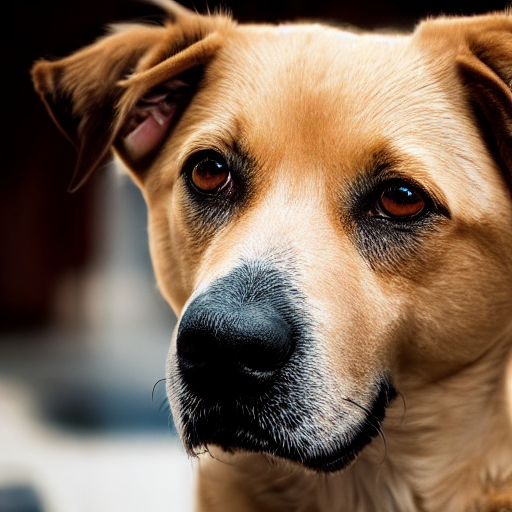
Fig. 8.6 Image generated on MN-Core2 for the prompt dog
8.2.7.4. Appendix
8.2.7.4.1. configs.toml
title = "stable_diffusion_training"


[mlsdk]
num_compiler_threads          = -1
do_quiet_compilation          = false
skip_text_encoder_compilation = false
skip_unet_compilation         = false
skip_vae_encoder_compilation  = false
skip_vae_decoder_compilation  = false


[model]
model_path          = "CompVis/stable-diffusion-v1-4"
# Can also set model_path to fine-tuned model created by `stable_diffusion_training.py`
# For example,
#   ./stable_diffusion_training.py --outdir /tmp/sd_train
# Then, the model will be saved to
#   model_path = "/tmp/sd_train/model"
height              = 512                             # height for input image
width               = 512                             # width for input image
do_lora             = false
lora_rank           = 4
init_lora_weights   = ""


[dataset]
data_cache_dir = ""


[training]
epoch                   = 1
save_model              = true
optimizer               = "sgd"
learning_rate           = 1e-4
momentum                = 0.2
weight_decay            = 1e-2
lr_scheduler            = "constant"
use_mncore_lr_scheduler = false
lr_warmup               = 500
use_pretrained_unet     = true  # Fine-tune pretrained UNet


[inference]
guidance_scale = 7.5
skip_safety_check = true  # Set to `true` to prevent black image generation


[misc]
seed       = 0
batch_size = 1
8.2.7.4.2. name_list.txt
airplanes,
ak47,
american-flag,
backpack,
baseball-bat,
baseball-glove,
basketball-hoop,
bat,
bathtub,
bear,
beer-mug,
billiards,
binoculars,
birdbath,
blimp,
bonsai,
boom-box,
bowling-ball,
bowling-pin,
boxing-glove,
brain,
breadmaker,
buddha,
bulldozer,
butterfly,
cactus,
cake,
calculator,
camel,
cannon,
canoe,
car-side,
car-tire,
cartman,
cd,
centipede,
cereal-box,
chandelier,
chess-board,
chimp,
chopsticks,
clutter,
cockroach,
coffee-mug,
coffin,
coin,
comet,
computer-keyboard,
computer-monitor,
computer-mouse,
conch,
cormorant,
covered-wagon,
cowboy-hat,
crab,
desk-globe,
diamond-ring,
dice,
dog,
dolphin,
doorknob,
drinking-straw,
duck,
dumb-bell,
eiffel-tower,
electric-guitar,
elephant,
elk,
ewer,
eyeglasses,
faces-easy,
fern,
fighter-jet,
fire-extinguisher,
fire-hydrant,
fire-truck,
fireworks,
flashlight,
floppy-disk,
football-helmet,
french-horn,
fried-egg,
frisbee,
frog,
frying-pan,
galaxy,
gas-pump,
giraffe,
goat,
golden-gate-bridge,
goldfish,
golf-ball,
goose,
gorilla,
grand-piano,
grapes,
grasshopper,
greyhound,
guitar-pick,
hamburger,
hammock,
harmonica,
harp,
harpsichord,
hawksbill,
head-phones,
helicopter,
hibiscus,
homer-simpson,
horse,
horseshoe-crab,
hot-air-balloon,
hot-dog,
hot-tub,
hourglass,
house-fly,
human-skeleton,
hummingbird,
ibis,
ice-cream-cone,
iguana,
ipod,
iris,
jesus-christ,
joy-stick,
kangaroo,
kayak,
ketch,
killer-whale,
knife,
ladder,
laptop,
lathe,
leopards,
license-plate,
light-house,
lightbulb,
lightning,
llama,
mailbox,
mandolin,
mars,
mattress,
megaphone,
menorah,
microscope,
microwave,
minaret,
minotaur,
motorbikes,
mountain-bike,
mushroom,
mussels,
necktie,
octopus,
ostrich,
owl,
palm-pilot,
palm-tree,
paper-shredder,
paperclip,
pci-card,
penguin,
people,
pez-dispenser,
photocopier,
picnic-table,
playing-card,
porcupine,
pram,
praying-mantis,
pyramid,
raccoon,
radio-telescope,
rainbow,
refrigerator,
revolver,
rifle,
rotary-phone,
roulette-wheel,
saddle,
saturn,
school-bus,
scorpion,
screwdriver,
segway,
self-propelled-lawn-mower,
sextant,
sheet-music,
skateboard,
skunk,
skyscraper,
smokestack,
snail,
snake,
sneaker,
snowmobile,
soccer-ball,
socks,
soda-can,
spaghetti,
speed-boat,
spider,
spoon,
stained-glass,
starfish,
steering-wheel,
stirrups,
sunflower,
superman,
sushi,
swan,
swiss-army-knife,
sword,
syringe,
t-shirt,
tambourine,
teapot,
teddy-bear,
teepee,
telephone-box,
tennis-ball,
tennis-court,
tennis-racket,
tennis-shoes,
theodolite,
toad,
toaster,
tomato,
tombstone,
top-hat,
touring-bike,
tower-pisa,
traffic-light,
treadmill,
triceratops,
tricycle,
trilobite,
tripod,
tuning-fork,
tweezer,
umbrella,
unicorn,
vcr,
video-projector,
washing-machine,
watch,
waterfall,
watermelon,
welding-mask,
wheelbarrow,
windmill,
wine-bottle,
xylophone,
yarmulke,
yo-yo,
zebra,