4. Advanced Features
4.1. Features of gpfn3-smi
gpfn3-smi is a command-line utility for monitoring and managing MN-Core 2 (codename GPFN3) devices.
As a general principle of the MLSDK, users should not need to use any gpfn3-smi commands except list.
Device initialization processes are primarily handled automatically.
However, there may be cases where devices malfunction due to unintended reasons, or when advanced debugging is required, so we will also introduce these commands here.
For details about various commands and their usage, you can also check by specifying the --help option, but we recommend not using any commands beyond those described here.
4.1.1. gpfn3-smi list
Displays a list of available devices.
0: mnc2p27s0
1: mnc2p28s0
2: mnc2p42s0
3: mnc2p43s0
4: mnc2p171s0
5: mnc2p172s0
6: mnc2p187s0
7: mnc2p188s0
Device information is displayed in the format (Device Index): (Device Name).
The Device Index is a 0-based sequential number assigned to each available device, while the Device Name represents the name of the device on the compute node.
Since the available devices may change due to PFCP-side mechanisms, the mapping between Device Index and Device Name is not fixed.
When specifying which device to use for mlsdk.MNDevice, you should provide either the Device Index or auto.
4.1.2. gpfn3-smi reset <device>
Issues a reset to the specified device.
Usage: gpfn3-smi reset [options...] <device>

Examples:
    gpfn3-smi reset 0
<device> can accept either a Device Index or Device Name.
If executed successfully, the reset for the specified device will be completed.
Warning
If you reset a device that is currently locked by another program, progress made by that program may be lost.
4.1.3. gpfn3-smi clear <device>
Initializes all memory on the specified device (including DRAM, registers, etc.) with the specified value.
Clears all memory on the device. Mask registers are set to all ones regardless of the options.

Usage: gpfn3-smi clear [options...] <device>

Options:
  -pattern uint
         Fills the memory with the specified uint64 value instead of random bytes
  -seed int
         Seed value for random byte generation
  -zero
         Fills the memory with zeros instead of random bytes

Examples:
    gpfn3-smi clear --seed 1234 0
    gpfn3-smi clear --zero 0
    gpfn3-smi clear --pattern 0x5555555555555555 0
Due to the large amount of memory initialization involved, execution may take considerable time to complete.
4.2. Compile Options
The options parameter in mlsdk.Context.compile() primarily includes Compile Options that primarily affect the behavior of the code generator.
Each option can be specified either in options argument dictionary, or passed as a preset file via option_json argument.
If different values are provided for the same option, the values specified directly in options take precedence.
For example, when specifying both option_json and float_dtype, the configuration would look like this:
context.compile(
    ...
    options={
        "option_json": "/opt/pfn/pfcomp/codegen/preset_options/O1.json",
        "float_dtype": "float",
    },
)
Compile Options can be specified either as command-line options or as environment variables.
Through options, you primarily specify the former, but option_json also allows you to specify the latter.
Below we describe the available items for Compile Options.
4.2.1. Preset Options
A collection of preconfigured settings that combine appropriate options from the Compile Options menu to suit different user scenarios.
In MLSDK environments, these Preset Options are located under /opt/pfn/pfcomp/codegen/preset_options/.
O0.json: Prioritizes successful code generation compilation.O1.json: Uses the same scheduler as O2 and later, but with the most conservative optimization settings.O2.json: Implements scheduling utilizing simulated annealing.O3.json: Expands the search space from O2 and incorporates L1Merge.O4.json: Further expands the search space from O3.debug.json: Uses a simple scheduler without complex optimizations.
The optimization level increases from O0 to O4, resulting in more performant binary, but at the cost of longer compilation time due to extended scheduling phase.
Especially for O2 and later versions, the time spent on Node Simulation and subsequent simulated annealing increases, so we recommend using O1 or lower for basic compilation verification.
We also recommend reusing the results of Node Simulation by setting mlsdk.CacheOptions.
For “debug”, the configuration minimizes optimizations to facilitate easier examination of compilation results, making it less reliable for actual use compared to O0 or O1. Therefore, it isn’t intended for regular production use.
4.2.2. Command Line Options
4.2.2.1. option_json
Accepts the path to a JSON file containing compilation options, including environment variables. The JSON format is as follows:
{
    "envs": {
        "<CODEGEN_ENV_NAME>": <CODEGEN_ENV_VALUE>,
        ...
    },
    "args": [
        "--<option_name>=<option_value>",
        ...
    ],
    "name": <name>
}
envs: Allows specification of valid environment variables. If an existing environment variable is specified, the value inoption_jsonwill be ignored.args: Specifies each option in the order they appear. For example, to specifyfloat_dtype, use"--float_dtype=float". This option is ignored ifoption_jsonis specified (nested specifications are not supported).name(optional) : Allows assigning a name to the configuration.
Additionally, the option.json file generated in codegen_dir is a JSON file that can be specified in option_json.
By respecifying this file, you can reproduce the exact compilation options used when creating that codegen_dir.
4.2.2.2. float_dtype
An option that specifies which floating-point data type codegen should assign to Tensors of type torch.float32.
Also see the description for options in mlsdk.Context.compile().
options={"float_dtype": "<value>"},
mixed: Uses half-precision for GEMM operations (both input and output), and float precision otherwisehalf: Assigns half-precision to all such tensorsfloat: Assigns float precision to all such tensorsdouble: Assigns double-precision to all such tensors
4.2.2.3. layout_planner
Configures the Layout Planner.
options={"layout_planner": "<value>"},
lpz(default) : Uses Layout Planner Z, which is based onbidiorlegacywith improvementsbidi: Uses bidirectional layout plannerlegacy: Uses legacy layout planner
4.2.2.4. scheduler
Configures the Scheduler.
options={"scheduler": "<value>"},
always_from_dram: Always downloads data from DRAM before executing each operation and uploads the outputs after execution.reuse_consecutive(default) : Similar toalways_from_dram, but utilizes existing data in SRAM output by the previous layer.spill_opt: Delays uploading data until SRAM becomes full.auto_recompute_sa: Anneals the order of operations and SRAM-only values.
The scheduler at the bottom performs more advanced optimizations, but takes longer to complete.
4.2.2.5. simulation_mode
Configures the Node Simulation.
options={"simulation_mode": "<value>"},
auto: Selects an appropriatesimulation_modebased on thescheduler.default: Simulates appropriate patterns of ConstrainAssignment.fast: Simulates specific patterns of ConstrainAssignment.best: Simulates all possible patterns of ConstrainAssignment, with some simulations potentially failing.full: Simulates all patterns of ConstrainAssignment regardless of any failures and duplications.fake: No actual simulation, only rough estimations. (Hence the fastest option.)
Each simulated pattern is generated from combinations of locations and parameters, and the implementation developer sets expected success probabilities for each pattern. More advanced configurations will also attempt to simulate patterns that may fail, potentially resulting in failures. In such cases, those patterns will not be used, and scheduling will proceed based solely on successfully simulated patterns. However, if no patterns succeed at all, compilation will be terminated at the Node Simulation phase.
4.2.2.6. sram_budget
Specifies the percentage of available LM resources to use, ranging from 0 to 1 (default).
options={"sram_budget": <float value>},
4.2.2.7. sa_expected_run_iters
Specifies the number of iterations for the annealing-based optimization loop. The default value is 0, which means the loop will run indefinitely until sufficient optimization is achieved. However, it’s better to set a reasonable value to prevent excessive scheduling time.
options={"sa_expected_run_iters": <int value>},
4.2.2.8. out_onnx
Outputs the optimized ONNX to the specified path in MLSDK Pipeline and Backend Correspondence.
options={"out_onnx": </path/to/compiled.onnx>},
4.2.2.9. layout_spec
Configures the Layout using the specified JSON file.
options={"layout_spec": </path/to/layout_spec.json>},
Each entry in the JSON file should contain the following fields:
trigger: EitherSwitchInputorFixOutput, indicating whether to apply the layout to the input or output of the specified operator.op_type: The operator type (op_type) to which the layout applies.shape: The shape of the tensor to which the layout applies.layout: The memory layout specification.
Example of layout_spec.json:
[
   {
      "trigger": "SwitchInput",
      "op_type": "Gather",
      "shape": [151936, 1536],
      "layout": "((75_Time:4, 8_L2B:1, 16_MAB:1, 4:1, 4:4), (4_Time:1, 24:16, 4_W:1, 4_PE:1); B@[L1B])"
   },
   {
      "trigger": "FixOutput",
      "op_type": "ChainerIndexAdd",
      "shape": [151936, 1536],
      "layout": "((75_Time:4, 8_L2B:1, 16_MAB:1, 4:1, 4:4), (4_Time:1, 24:16, 4_W:1, 4_PE:1); B@[L1B])"
   }
]
4.2.2.10. gemm_layout_spec
Configures the Layout for GEMM using the specified JSON file.
options={"gemm_layout_spec": </path/to/gemm_layout_spec.json>},
Each entry in the JSON file should contain the following fields:
key: The unique identifier for the GEMM operation.A: The memory layout specification for matrix A.BT: The memory layout specification for the transposed matrix B.C: The memory layout specification for matrix C.
Example of gemm_layout_spec.json:
[
   {
      "key": "embed_tokens",
      "A": "((), (8:3072, 8_L1B:1, 2_Time:1, 2:1536, 16:1), (96:16, 4_W:1, 4_PE:1))",
      "BT": "((25_Time:1, 3:1536, 8_L2B:1, 16_MAB:1, 4:1, 4:4), (96:16, 4_W:1, 4_PE:1); B@[L1B])",
      "C": "((), (8:96, 8_L1B:1, 2_Time:25, 2:48, 16:1), (25_Time:1, 3:16, 8_L2B:1, 16_MAB:1, 4_W:1, 4_PE:1))"
   }
]
4.2.3. Environment Variables
4.2.3.1. CODEGEN_FIND_BEST_COMPILE_OPTIONS
Try all available Emit strategies and find the optimal one.
4.2.3.2. CODEGEN_FIND_BETTER_COMPILE_OPTIONS
Try out reasonable options from the available Emit strategies and find the optimal one.
4.2.3.3. CODEGEN_SCHEDULE_PP_BEAM_MAX_TURN
Maximum number of turns in the beam search for node reordering. -1 means no limit.
4.2.3.4. CODEGEN_SCHEDULE_PP_BEAM_TURN_PRUNE_LIMIT
Maximum number of turns without improvement in the beam search for node reordering.
4.2.3.5. CODEGEN_SCHEDULE_PP_BEAM_WIDTH
Maximum number of candidates to consider in the beam search for node reordering.
4.2.3.6. CODEGEN_USE_MERGE
Enable l1merge
4.2.3.7. CODEGEN_USE_PARALLEL_MERGE
Parallelize l1merge in an O(log(N)) manner
4.2.3.8. CODEGEN_SA_STEPS
Controls the number of steps (iterations) in the simulated annealing optimization process used by the scheduler. The default value is 1,000,000 steps. Higher values may lead to better optimization results but will increase compilation time. This is particularly relevant when using the auto_recompute_sa scheduler.
4.2.3.9. CODEGEN_NUM_SA_THREADS
Controls the number of threads used for simulated annealing optimization. Default is 1. Higher values can parallelize the annealing process but may require more memory and CPU resources.
4.2.3.10. CODEGEN_N_TRANSPOSE_THREADS
Specifies the number of threads used for data staging operations, particularly transpose operations during data transfer. Default is 8 threads. Higher values can improve data transfer throughput only when multiple transpose operations can be parallelized.
4.2.3.11. CODEGEN_N_DEV_COPY_STREAMS_THREADS
Controls the number of parallel streams used for device-to-host and host-to-device data transfer operations. Default is 8 streams. Higher values can improve data transfer performance only when multiple transfers can occur simultaneously.
4.2.3.12. CODEGEN_ENABLE_SET_PARTIAL_LOCATION
Enables setting partial location (LM/DRAM) in ResolveInconsistentDRAMInput during the scheduling phase. This can help optimize memory placement decisions but may affect compilation time.
4.2.3.13. CODEGEN_GEMM_FORCE_CHANNEL_SPLIT
Forces GEMM operations to always use channel splitting optimization. This can be useful for debugging or when specific memory layouts are required for GEMM computations.
4.2.3.14. CODEGEN_OP_DEF
Specifies custom operation definitions for the code generator. This advanced option allows overriding default operation behaviors or adding custom operation implementations.
Example:
CODEGEN_OP_DEF=Gather=GatherReduce,ChainerIndexAdd=IndexAddReduce
4.2.3.15. CODEGEN_SKIP_RESOLVE_NEGATIVE_INDICES
Skips the resolution of negative indices in tensor operations during compilation. This can be used as a debugging or optimization option when negative indexing is not expected.
4.2.3.16. CODEGEN_TIME_SLICE_SCATTERED_INDEXING_BCAST
Controls the behavior of time slicing for scattered indexing with broadcast operations. This affects how memory access patterns are optimized for complex indexing operations.
4.2.3.17. CODEGEN_LAYOUT_PLANNER_Z_HONOR_LAYOUT_SPEC
When enabled, the Layout Planner Z honors layouts specified in layout specifications instead of optimizing them automatically. Useful when specific memory layouts are required.
4.2.3.18. CODEGEN_MAX_TIME_SLICE
Sets the maximum number of time slices allowed during compilation. Default is 256. The compiler will abort if the number of required time slices exceeds this limit. Can be increased for models that require more complex time slicing.
4.2.3.19. CODEGEN_IGNORE_LAYOUT_CHECK
Disables layout consistency checks during compilation. This debug option can be used to bypass layout validation when troubleshooting compilation issues, but may result in incorrect execution.
4.2.3.20. CODEGEN_ALLOW_UNUSED_LAYOUT_SPEC
Allows layout specifications to remain unused without causing compilation errors. Useful for debugging or when layout specifications are provided but not all are expected to be utilized.
4.2.3.21. CODEGEN_USE_ADDR_FIRST_Z
Enables address-first optimization in the Layout Planner Z. This affects the order in which memory addresses are assigned and can influence memory access patterns and performance.
4.2.3.22. CODEGEN_LAYOUT_PLANNER_Z
Forces the use of Layout Planner Z, ignoring the --layout_planner command line option. This overrides the layout planner selection to always use the Z variant.
4.2.3.23. CODEGEN_ALARM
Sets an alarm clock in seconds when positive. Only used by run_onnx_mncore. When the timeout expires, the compilation process will be interrupted. See man alarm for more details on alarm functionality.
4.2.3.24. CODEGEN_IGNORE_REUSED_VALUE_LAYOUT
Ignores layout constraints for reused values during layout planning. This can help resolve layout conflicts but may impact memory efficiency and performance.
4.2.3.25. CODEGEN_DEFER_SIMPLIFY
Specifies a comma-separated list of simplify functions to defer to post-PFVM passes. This allows fine-tuning of when certain graph simplifications are applied during compilation.
4.2.3.26. CODEGEN_NODE_SIM_ALLOW_UNEXPECTED_FAIL
Allows node simulation to continue even when unexpected failures occur. This debug option can help identify issues in node simulation but may lead to suboptimal results.
4.2.3.27. CODEGEN_FORCE_ATTENTION_GRAD_AFTER_FORWARD
Forces attention gradient computation to be scheduled after the forward pass. This can help with memory management and scheduling optimization for attention-based models.
4.2.3.28. CODEGEN_AUTO_RECOMPUTE_HACK_FOR_QWEN
Enables specific auto-recompute optimizations for Qwen models. This model-specific optimization can improve memory usage and performance for Qwen-based neural networks.
4.2.3.29. CODEGEN_STOP_USING_GENERIC_INDEXING_GATHER_INDEX_ADD
Disables the use of generic indexing for gather index add operations. This can be used to force alternative implementations that may be more suitable for specific use cases.
4.2.3.30. CODEGEN_GEMM_FORCE_WEIGHT_ON_DRAM
Forces GEMM operation weights to always be placed in DRAM instead of local memory (LM). This can be useful for memory management when dealing with large weight matrices.
4.2.3.31. CODEGEN_LPZ_SKIP_PROPAGATE_TIME
Skips time propagation in Layout Planner Z. This affects how temporal dependencies are handled during layout planning and can influence scheduling decisions.
4.2.3.32. CODEGEN_OPS_ON_HOST
Specifies a comma-separated list of operation types to execute on the host instead of the device. For example, CODEGEN_OPS_ON_HOST=Exp,Log will run exponential and logarithm operations on the CPU rather than MN-Core.
4.2.3.33. MNCORE_USE_EXTERNAL_DATA_FORMAT
Enables the use of external data format for ONNX serialization. When enabled, large tensors are stored in separate files rather than embedded in the ONNX model, reducing memory usage during model loading.
4.2.3.34. PFVM_DISABLE_CONSTANT_REUSE
Disables constant reuse optimization in PFVM passes. When set, constants will not be shared across different parts of the computation graph, which may increase memory usage but can simplify debugging.
4.3. Directly loading codegen_dir
While setting cache options allows reusing compilation results, this incurs additional overhead as function tracing is required to select the appropriate GPFNApp during reruns.
Conversely, using mlsdk.Context.load_codegen_dir() to directly reuse codegen_dir avoids this tracing overhead.
However, this assumes consistency in compiled functions and input tensor dimensions, making it unsuitable for typical development use cases.
4.3.1. Usage Example
See Example: Load codegen_dir for usage examples.
8# Load the previously compiled function
9loaded_add = context.load_codegen_dir(storage.path("/tmp/add_two_tensors"))
A mlsdk.CompiledFunction can be created directly without calling mlsdk.Context.compile().
4.4. Codegen Dashboard
The Codegen Dashboard is a tool for inspecting contents of codegen_dir in a web browser.
Note
Some files within codegen_dir are compressed using Zstandard and have the .zst extension.
Such files may not be able to be properly directed to a viewer and may require decompression first.
$ cd <codegen_dir> && zstd -d <filename>.zst
4.4.1. Starting the Dashboard
Run
codegen-dashboard-externalinservemode within the workspace Pod.
$ /opt/pfn/pfcomp/codegen/build/codegen-dashboard/codegen-dashboard-external serve <codegen_dir> --port 8327
Perform a local
kubectl port-forwardto the specified port.
$ kubectl port-forward pod/<pod-name> 8327:8327
Access
http://localhost:8327in your web browser.
4.4.2. Summary
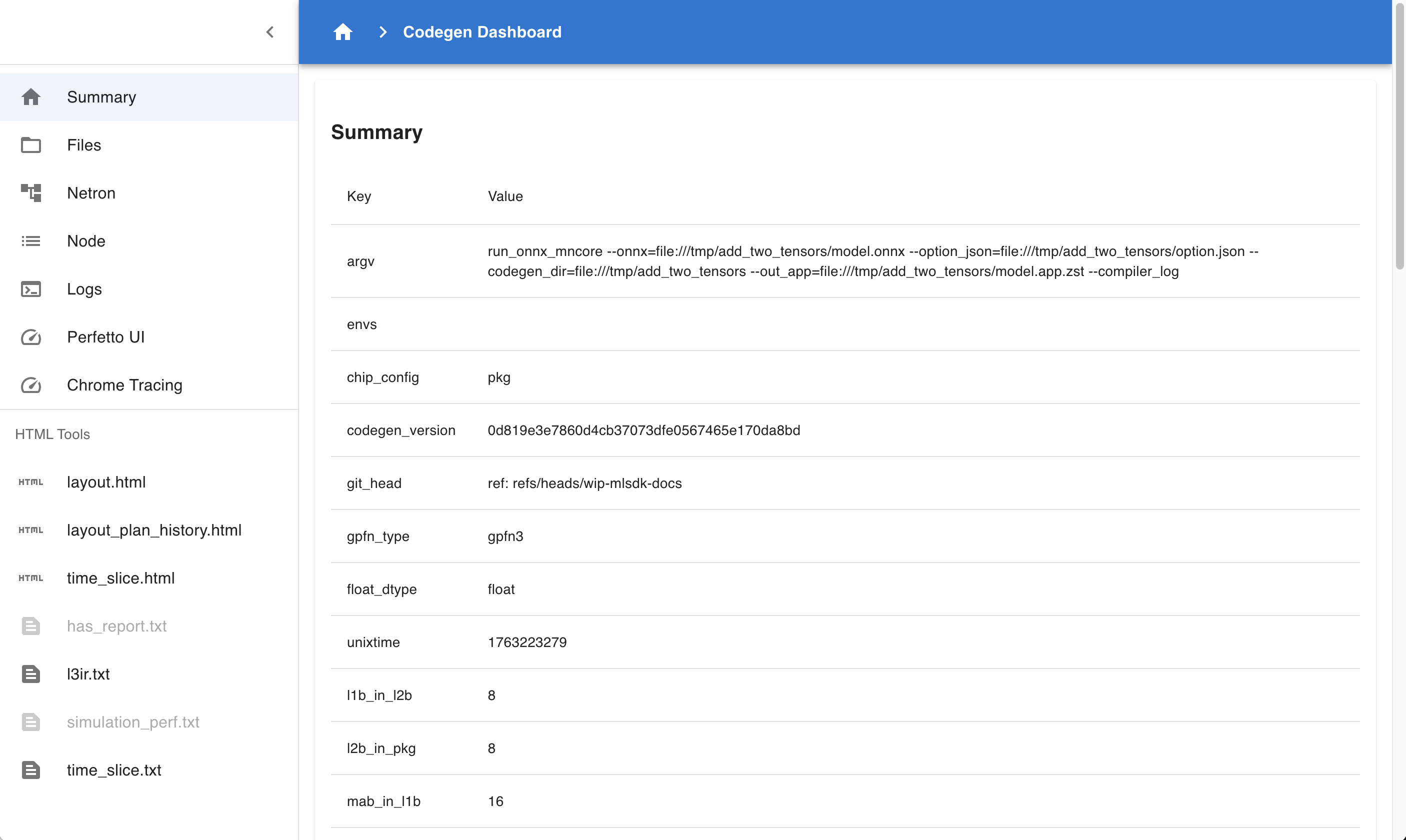
Fig. 4.1 Codegen Dashboard: Summary
This page summarizes the contents of codegen_dir.
Summary : Displays information about executed commands, hardware configuration, etc.
flopsspecifically indicates the number of computations in the computation graph, allowing rough estimation of scale.Compile Statuses : Lists whether each Phase was successful and the time taken.
Layers : Displays information about each Layer in MNGraph.
Perf Stats : Breaks down Layer contents by attribute and summarizes processing times for each.
ALLspecifically represents the total computation time, enabling verification of optimization levels achieved through Compile Options.
4.4.3. Netron
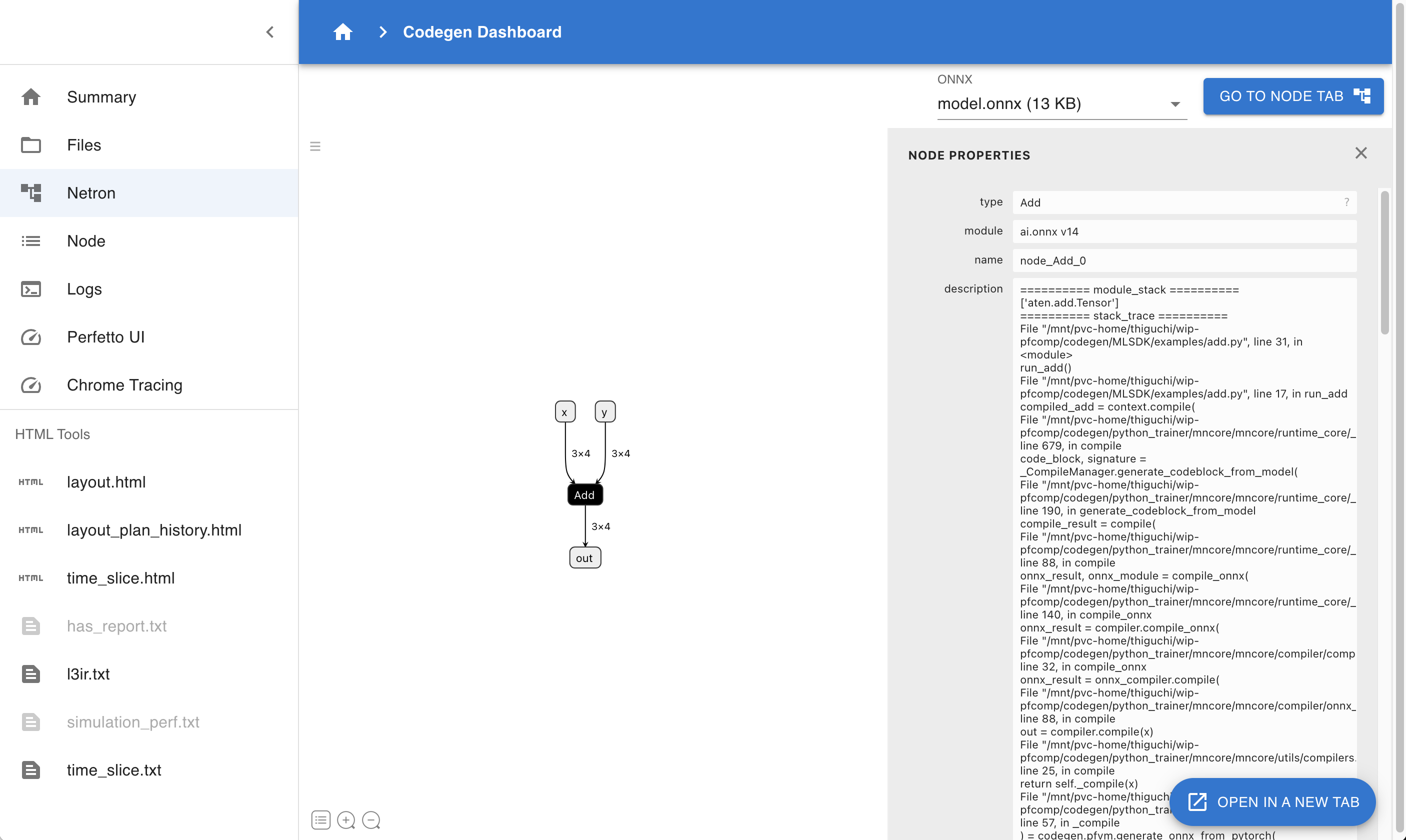
Fig. 4.2 Codegen Dashboard: Netron
Use Netron to visualize ONNX files contained in codegen_dir. If multiple ONNX files exist, you can choose which one to examine.
4.4.4. Node
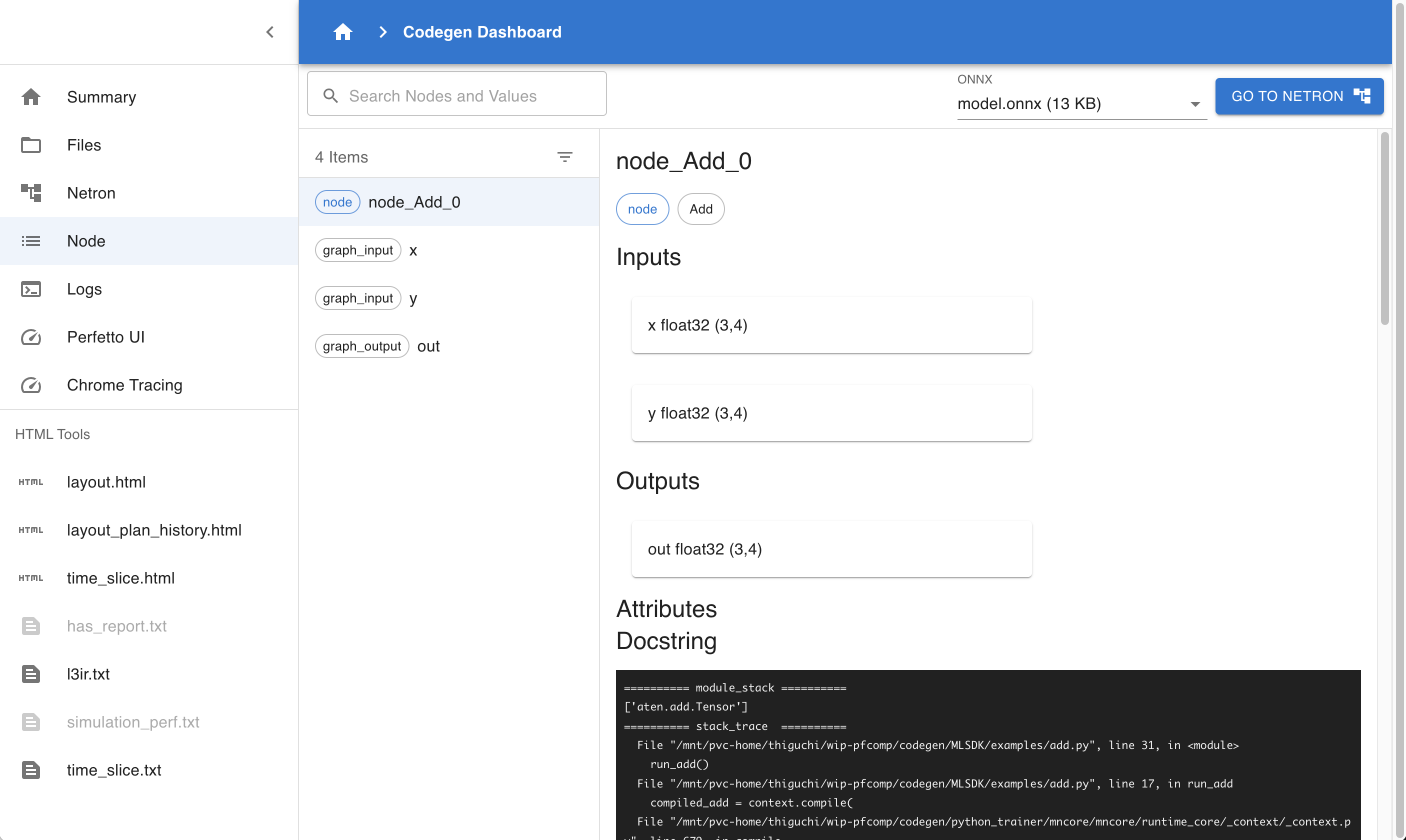
Fig. 4.3 Codegen Dashboard: Node
Similar to Netron, this page allows inspection of ONNX file contents. However, since it doesn’t perform graph visualization, it operates more efficiently even for large cases.
4.4.5. Logs
Allows viewing MLSDK log outputs.
CLOG.log: PFVM logs.glog/codegen...: codegen logs. When running in multi-process mode, each process logs to a separate file.
4.4.6. Perfetto UI
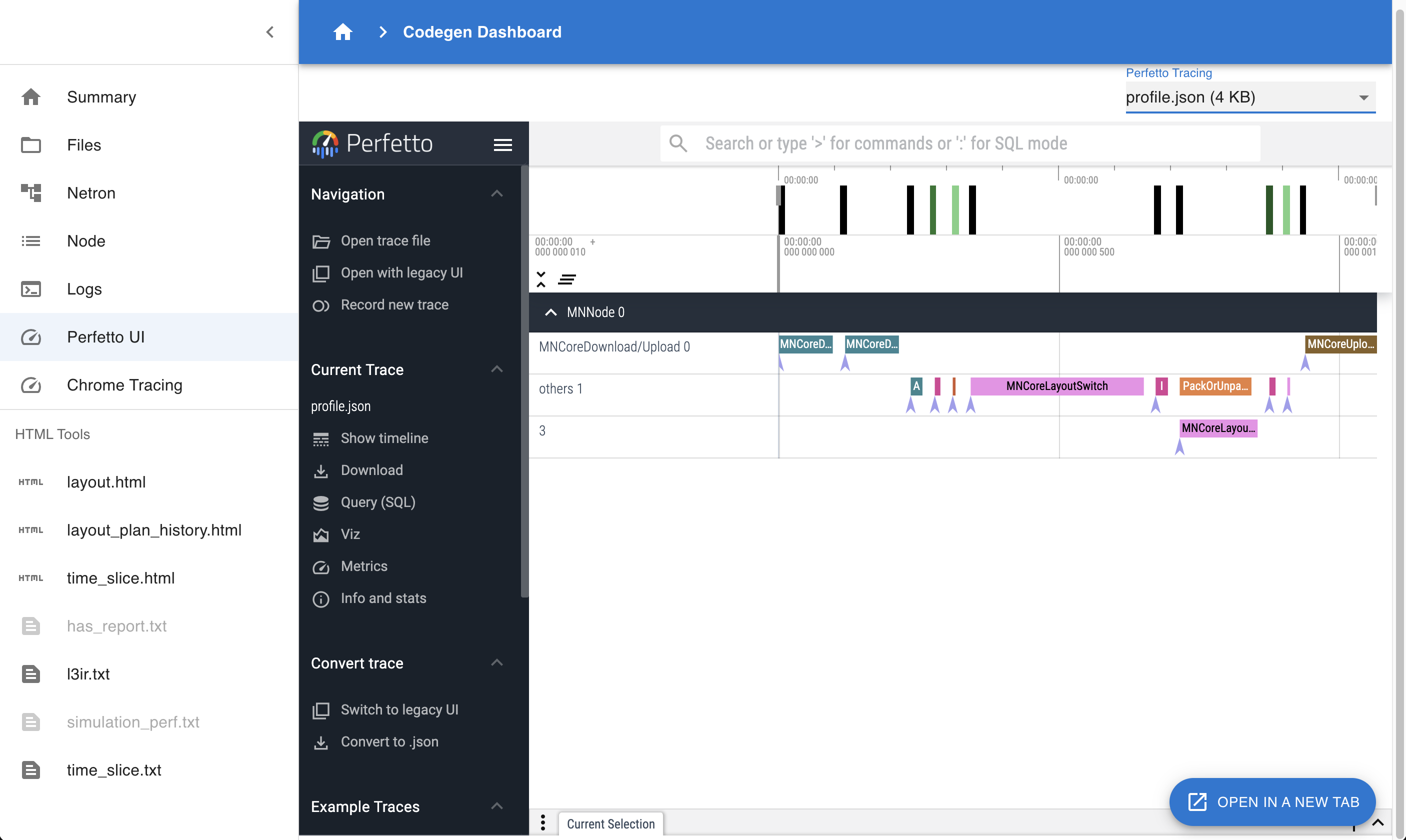
Fig. 4.4 Codegen Dashboard: Perfetto UI
Visualize Perfetto UI using files like profile.json or trace.json.
Useful for examining when each Layer executes on the device and for how long.
4.4.7. Chrome Tracing
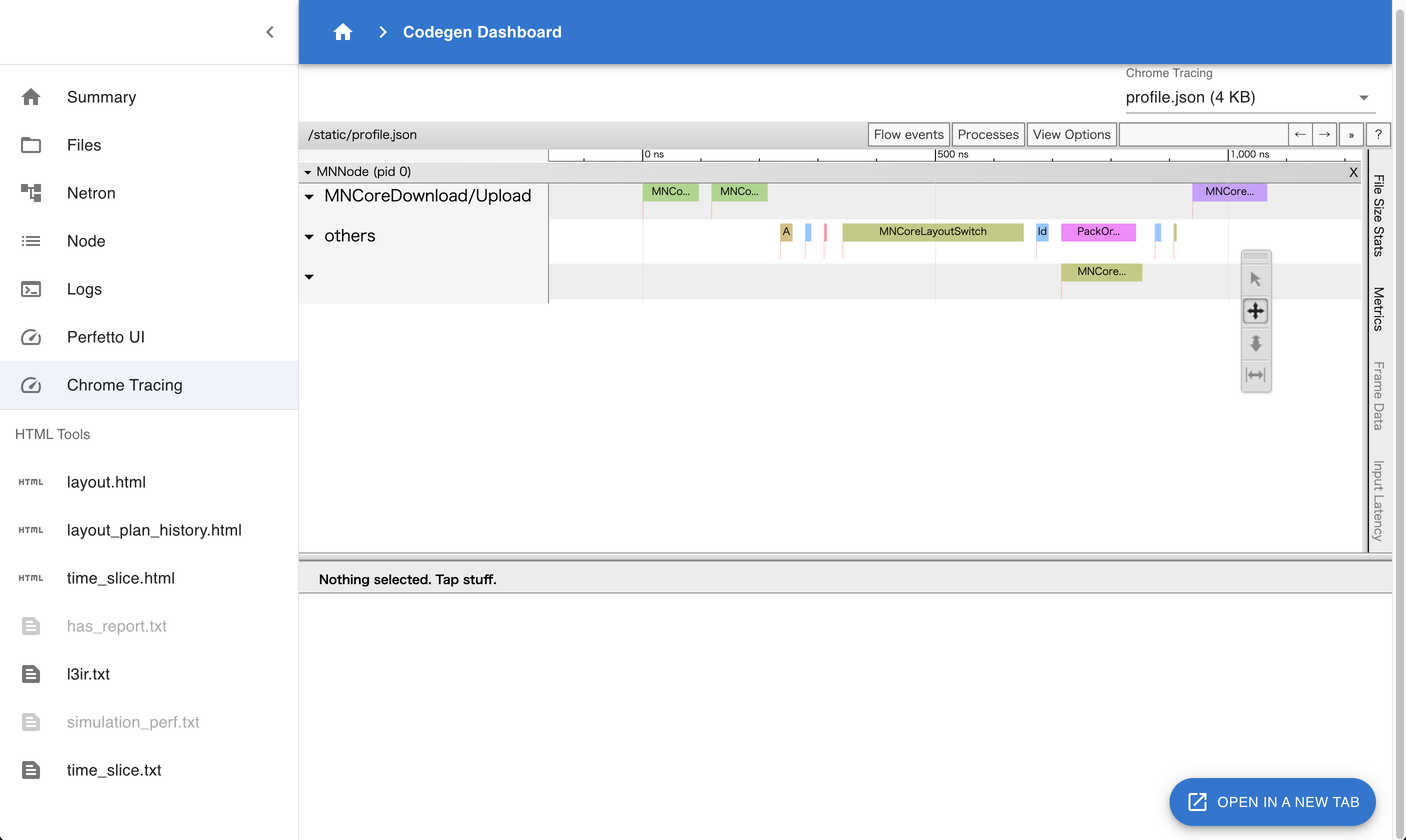
Fig. 4.5 Codegen Dashboard: Chrome Tracing
The information viewable here is essentially the same as with Perfetto UI, but this visualization uses the Chrome Tracing mechanism.
4.4.8. HTML Tools
layout.html: Contains the final Layout settings applied to the MNGraph.layout_plan_history.html: Documents the sequence of Layout configuration applied to the MNGraph.time_slice.html: Displays the Layout state immediately before graph branching occurs due to Time-Slice.l3ir.txt: Represents the MNGraph including its computation schedule.time_slice.txt: Represents the MNGraph including its computation schedule immediately before graph branching occurs due to Time-Slice.
4.5. Data Transfer via TensorProxy
mlsdk.TensorProxy is an object that represents a device-side tensor corresponding to a torch.Tensor on the host.
Examples include tensors passed as input to mlsdk.CompiledFunction or parameters registered via mlsdk.Context.register_param().
For each such case, a corresponding TensorProxy is created, and their mapping relationships are recorded in the registry within the mlsdk.Context.
Data communication between the host and device in MLSDK is handled through TensorProxy.
While device-to-host communication (D2H) requires explicit instruction by MLSDK users, as demonstrated by the mlsdk.TensorProxy.cpu() method introduced in Getting Started, host-to-device communication (H2D) occurs implicitly.
This approach generally suffices for normal usage, but for optimization purposes where you need to specify H2D timing, there are available APIs that can be used.
Note
Technically, this is an API for explicitly indicating when H2D should begin, so the entire communication process is asynchronous. Currently, we do not provide any APIs for directly checking the completion of H2D operations.
4.5.1. Obtaining TensorProxy Objects
First, you need to obtain a TensorProxy corresponding to the torch.Tensor you wish to perform H2D operations on.
Inputs for CompiledFunctions
mlsdk.CompiledFunction.allocate_input_proxy() is an API for retrieving TensorProxy objects corresponding to inputs in a CompiledFunction.
When called, it allocates a buffer on the device’s DRAM for storing the input data and returns a Dict[str, TensorProxy] object containing the corresponding keys and TensorProxy mappings.
Registered Tensors in the Context
mlsdk.Context.get_registered_value_proxy() is an API for retrieving TensorProxy objects registered with the Context using either mlsdk.Context.register_param() or mlsdk.Context.register_buffer().
In this case, since device DRAM space has already been allocated for each TensorProxy, no new DRAM allocation occurs.
The API arguments should be the torch.Tensor objects registered via register_param or register_buffer, and the corresponding TensorProxy objects will be returned.
4.5.2. Feeding Values into TensorProxy Objects
Next, you need to feed torch.Tensor values into the obtained TensorProxy objects.
mlsdk.TensorProxy.load_from() accepts a torch.Tensor object tensor and a bool flag clone, then initiates the communication process.
tensor
The value to be fed into the TensorProxy.
It can be the same object as the torch.Tensor passed to Context.compile or registered with the Context, provided the dimensions and data types match.
clone (default: True)
True: Copies the content oftensorand places it in the transfer queue. This method is safe even iftensoris modified afterward, but involves copy overhead.False: Places a reference totensorin the transfer queue. This method avoids copy costs but may result in undefined behavior iftensoris modified during transit. This is acceptable iftensoris a temporary object.
4.5.3. Usage Example
See Example: Explicitly Transferring Data Between Host And Device for usage examples.
Input for CompiledFunction
33    input_proxies_allocated = compiled_infer.allocate_input_proxy()
34    input_proxies_allocated["x"].load_from(torch.ones(4, 4), clone=False)
The prepared input_proxies_allocated is used as input for the later compiled_infer operation.
Tensors Registered in the Context
36    for model_param in model.parameters():
37        model_param_proxy = context.get_registered_value_proxy(model_param)
38        model_param_proxy.load_from(model_param)
Each model_param was originally transferred from H2D after starting compiled_infer, but we initiated the communication process beforehand.
4.5.4. Advanced Usage Tips
For use cases involving model training loops, the basic progression involves repeating these steps 1-4:
Retrieve input data from the data loader
Transfer input data from H2D
Execute the
CompiledFunctionTransfer output data from D2H (synchronous)
A key point to note is that during H2D transfers, transpose operations are required to match the MN-Core’s memory layout, making host-side processing a potential bottleneck. Therefore, interleaving steps 1 and 2 between steps 3 and 4 allows for effective overlap of host and device processing.